简单websocket聊天室

快速完成聊天室核心功能

学习和使用springBoot框架下的websocket,完成聊天室的核心功能
通过阅读文档,配合官方demo,快速的学习和使用websocket技术

服务端 基础版

springBoot WebSocket

Maven依赖

1
2
3
4
5
<!--WebSocket-->
<dependency>
<groupId>org.springframework.boot</groupId>
<artifactId>spring-boot-starter-websocket</artifactId>
</dependency>

配置类

1
2
3
4
5
6
7
8
9
10
11
12
13
14
15
16
17
18
19
20
21
22
23
24
25
26
27
package cn.shirtiny.community.SHcommunity.Config;

import org.springframework.context.annotation.Configuration;
import org.springframework.messaging.simp.config.MessageBrokerRegistry;
import org.springframework.web.socket.config.annotation.EnableWebSocketMessageBroker;
import org.springframework.web.socket.config.annotation.StompEndpointRegistry;
import org.springframework.web.socket.config.annotation.WebSocketMessageBrokerConfigurer;

@Configuration
//消息订阅器
@EnableWebSocketMessageBroker
public class WebSocketConfig implements WebSocketMessageBrokerConfigurer {

@Override
public void registerStompEndpoints(StompEndpointRegistry registry) {
//添加服务端接口 终端点 js连接: let socket=new SockJS('/websocket');
registry.addEndpoint("/websocket").withSockJS();
}

@Override
public void configureMessageBroker(MessageBrokerRegistry registry) {
//允许客户端订阅主题/room
registry.enableSimpleBroker("/room");
//注册 app的前缀/app
registry.setApplicationDestinationPrefixes("/app");
}
}
  • Endpoint为客户端连接服务端websocket服务,服务端通过SimpleBroker控制客户端的订阅的主题、频道,客户端发送消息时,需要带ApplicationDestinationPrefixes中的前缀。

Controller

1
2
3
4
5
6
7
8
9
10
11
@Controller
public class WebSocketController {

//接收消息的接口路径,聊天室频道
@MessageMapping("/sendToRoom")
//发送到 /room/chat 频道
@SendTo("/room/chat")
public ShResultDTO<String,Object> retString(@RequestBody ChatMessageDTO message ) {

return new ShResultDTO<>();
}
  • @MessageMapping("/sendToRoom"),使用上类似于@RequestMapping,不过客户端发送消息时,需要带上ApplicationDestinationPrefixe前缀,如:/app/sendToRoom,使用的为ws协议,完整的写法为:ws://ip:port/app/sendToRoom

  • @SendTo("/room/chat")会把返回结果广播到/room/chat频道

客户端 基础版

sockjs-client + stomp-websocket

Maven依赖

1
2
3
4
5
6
7
8
9
10
<dependency>
<groupId>org.webjars</groupId>
<artifactId>sockjs-client</artifactId>
<version>1.0.2</version>
</dependency>
<dependency>
<groupId>org.webjars</groupId>
<artifactId>stomp-websocket</artifactId>
<version>2.3.3</version>
</dependency>

springBoot可以用这种方式使用静态资源,前端页面引入方式:

1
2
<script src="/webjars/sockjs-client/sockjs.min.js"></script>
<script src="/webjars/stomp-websocket/stomp.min.js"></script>

建立连接

1
2
3
4
5
6
7
8
9
10
11
//连接socket
connect: function () {
//建立socket连接
let socket = new SockJS('/websocket');
stompClient = Stomp.over(socket);
//连接socket
stompClient.connect({}, function (frame) {
console.log("连接socket: /websocket");
console.log(frame);
});
},

断开连接

1
2
3
4
5
6
7
8
9
10
11
12
13
//断开socket连接
disconnect: function () {
console.log(this.isConnected);
if (stompClient !== null && this.isConnected === true) {
stompClient.disconnect(() => {
console.log("断开socket连接");
});
this.$notify.success({
title: '√',
message: '已断开连接'
});
}
},

订阅频道

每次订阅都将生成一个客户端id,订阅后会持续接收服务端的广播,每次接收都会更新响应数据

1
2
3
4
5
6
7
8
9
10
11
12
13
//订阅频道
subscribeChatRoom: function () {
//订阅 /room/chat 频道,每次订阅频道广播数据时都会执行回调方法
this.chatSubscribe = stompClient.subscribe('/room/chat', retData => {
// console.log("频道: /room/chat,响应数据为:");
// console.log(retData);
//存储订阅频道发过来的数据
let res = JSON.parse(retData.body);
console.log("你订阅的频道更新啦!!!!!~");
});
console.log("订阅频道,接收到的对象:");
console.log(this.chatSubscribe);
},

取消订阅

取消订阅需要使用之前此订阅对象的unsubscribe()方法

1
2
3
4
5
//取消订阅聊天室频道
unsubscribeChat: function () {
this.chatSubscribe.unsubscribe();
console.log("取消订阅");
},

发送消息

需要带有指定前缀,header可以为空

1
2
3
4
//发送消息
sendMessage: function () {
stompClient.send("/app/sendToRoom", {}, "message");
},

案例

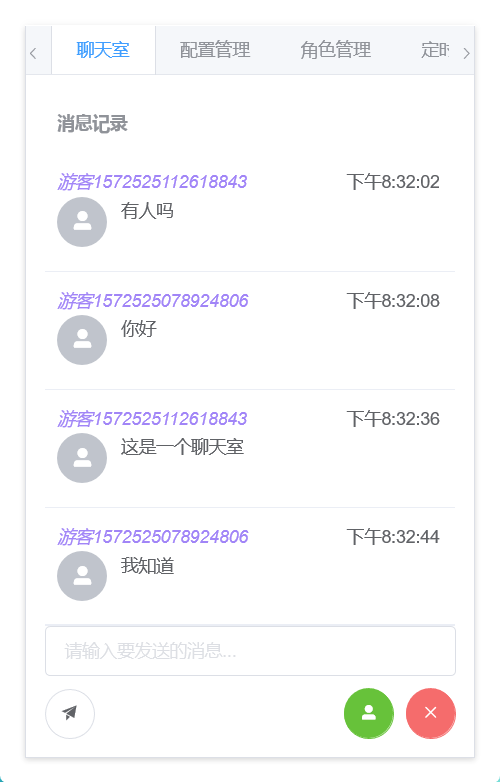
我以我社区的聊天室为例,前端样式上使用了elmentUI的表格,然后进行了自定义:
目前仍在完善中。

前端Vue+Element

1
2
3
4
5
6
7
8
9
10
11
12
13
14
15
16
17
18
19
20
21
22
23
24
25
26
27
28
29
30
31
32
33
34
35
36
37
38
39
40
41
42
43
44
45
46
47
48
49
50
51
52
53
54
55
56
57
58
59
60
61
62
63
64
65
66
67
68
69
70
71
72
73
74
75
76
77
78
79
80
81
82
83
84
85
86
87
88
89
90
91
92
93
94
95
96
97
98
99
100
101
102
103
104
105
106
107
108
109
110
111
112
113
114
115
116
117
118
119
120
121
122
123
124
125
126
127
128
129
130
131
132
133
134
135
136
137
138
139
140
141
142
143
144
145
146
147
148
149
150
151
152
153
154
155
156
157
158
159
160
161
162
163
164
165
166
167
168
169
170
171
172
173
174
175
176
177
178
179
180
181
182
183
184
185
186
187
188
189
190
191
192
193
194
195
196
197
198
199
200
201
202
203
204
205
206
207
208
209
210
211
212
213
214
215
216
217
218
219
220
221
222
223
224
225
226
227
228
229
230
231
232
233
234
235
236
237
238
239
240
241
242
243
244
245
246
247
248
249
250
251
252
253
254
255
256
257
258
259
260
261
262
<!DOCTYPE html>
<html lang="en" xmlns:th="http://www.thymeleaf.org">
<script src="/webjars/sockjs-client/sockjs.min.js"></script>
<script src="/webjars/stomp-websocket/stomp.min.js"></script>

<el-row id="vue_el_tab" th:fragment="el_tab" class="img-rounded">
<el-tabs v-model="activeName" @tab-click="clickTab" type="border-card">

<el-tab-pane label="聊天室" name="first">
<el-row style="height: 400px">
<el-col :span="24">
<el-table
:data="historyMessages"
style="width: 100%"
max-height="500"
id="messageTable"
>
<!--暂时只支持游客-->
<el-table-column
label="消息记录 "
min-width="280"
show-overflow-tooltip>

<div slot-scope="scope">
<el-row id="message_header">
<span v-if="scope.row.sender!=null" style="font-style: italic;color: #a185f7">{{scope.row.sender.nickName}}</span>
<span v-else-if="scope.row.sender==null" style="font-style: italic;color: #a185f7">游客{{scope.row.senderId}}</span>
<span class="float_right">{{fomateDate(scope.row.gmtCreated)}}</span>
</el-row>

<el-row id="message_content">
<el-col :span="4">
<el-avatar icon="el-icon-user-solid"></el-avatar>
</el-col>

<el-col :span="20">
<div style="display: block;">{{scope.row.chatMessageContent}}</div>
</el-col>
</el-row>
</div>

</el-table-column>
</el-table>
</el-col>
</el-row>
<el-row>
<el-col :span="24">
<el-input
placeholder="请输入要发送的消息..."
v-model="unsendChatMessage"
clearable>
</el-input>
<p></p>
</el-col>
</el-row>
<el-row>
<el-col :span="24">
<el-tooltip content="发送" placement="bottom" effect="light">
<el-button icon="el-icon-s-promotion" @click="sendMessage" circle></el-button>
</el-tooltip>

<el-tooltip content="登出" placement="bottom" effect="light">
<el-button id="unSubBtn" icon="el-icon-close" type="danger" class="float_right"
@click="unsubscribeChat"
circle></el-button>
</el-tooltip>
<el-tooltip content="登入" placement="bottom" effect="light">
<el-button id="subBtn" icon="el-icon-user-solid" type="success" class="float_right"
@click="subscribeChatRoom"
circle></el-button>
</el-tooltip>
</el-col>
</el-row>
</el-tab-pane>

<el-tab-pane label="配置管理" name="second">配置管理</el-tab-pane>
<el-tab-pane label="角色管理" name="third">角色管理</el-tab-pane>
<el-tab-pane label="定时任务补偿" name="fourth">定时任务补偿</el-tab-pane>
</el-tabs>
</div>
<style>
#vue_el_tab {
background-color: #fff;
padding: 20px 20px 20px 20px;
width: 400px;
}
</style>
<script>
const vue_el_tab = new Vue({
el: "#vue_el_tab",
data() {
return {
activeName: 'second',
//聊天室正在输入的消息
unsendChatMessage: '',
//聊天室历史消息
historyMessages: [],
//聊天室订阅的对象 为空时为不订阅状态
chatSubscribe: null,
//游客id
touristID: '',
//聊天室每个消息单元格的高度
cellHeight: 94,
//标识是否让滚动条 自动跟进新消息
letScollAtFoot: true,
};
},
computed: {
//游客用户名
touristName: function () {
return '游客' + this.touristID
}
},
methods: {
//切换tab时触发
clickTab(tab, event) {
console.log("点击tab");
console.log(tab.index);
if (tab.index == 0) {
//订阅聊天室
this.subscribeChatRoom();
}
},
//加载聊天室历史数据
loadChatHistoryDta() {
axios.get('/shApi/listChatRoomMessages').then(res => {
this.historyMessages = res.data.data.historyMessages;
console.log(this.historyMessages);
})
},
//订阅频道
subscribeChatRoom: function () {
//已订阅聊天室则不再订阅
if (this.chatSubscribe != null) {
return;
}
//订阅 /room/chat 频道,每次订阅频道广播数据时都会执行回调方法
this.chatSubscribe = stompClient.subscribe('/room/chat', retData => {
// console.log("频道: /room/chat,响应数据为:");
// console.log(retData);
//存储订阅频道发过来的数据
let res = JSON.parse(retData.body);
//更新历史消息
this.historyMessages = res.data.historyMessages;
console.log("你订阅的频道更新啦!!!!!~");
}, {id: 'client1'});
console.log("订阅频道,接收到的对象:");
console.log(this.chatSubscribe);

//订阅,加载聊天室历史数据
this.loadChatHistoryDta();

//提示
this.$notify.success({
title: '√',
message: '已订阅聊天室'
});
},
//取消订阅聊天室频道
unsubscribeChat: function () {
if (this.chatSubscribe == null) {
this.$notify.info({
title: '消息',
message: '已经退出聊天室了'
});
return;
}
this.chatSubscribe.unsubscribe();
console.log("取消订阅");
//把聊天室订阅对象置为null
this.chatSubscribe = null;
this.$notify.info({
title: '消息',
message: '已退出聊天室'
});

},
//发送消息
sendMessage: function () {
//在已订阅时,才发送和清空输入框
if (this.chatSubscribe != null) {
stompClient.send("/app/sendToRoom", {}, JSON.stringify({
chatMessageContent: this.unsendChatMessage,
senderId: Number(this.touristID)
}));
//清空输入框
this.unsendChatMessage = '';
}
},
//连接socket
connect: function () {
//建立socket连接
let socket = new SockJS('/websocket');
stompClient = Stomp.over(socket);
//连接socket
stompClient.connect({}, function (frame) {
console.log("连接socket: /websocket");
console.log(frame);
});
},
//断开socket连接
disconnect: function () {
console.log(this.isConnected);
if (stompClient !== null && this.isConnected === true) {
stompClient.disconnect(() => {
console.log("断开socket连接");
});
this.$notify.success({
title: '√',
message: '已断开连接'
});
}
},
//随机生成一个游客id,从后台获取数据
getTouristID() {
axios.get('/shApi/newChatRoomSenderId').then(res => {
console.log("获取游客id");
console.log(res);
this.touristID = res.data.data.touristID;
})
},
//日期格式化
fomateDate: function (dateStr) {
var date = Number(dateStr);
date = new Date(date).toLocaleString();
return date.split(" ")[1];
},
//判断滚动条是否在底部
scrollAtFoot: function () {
let elTable = $(`#messageTable .el-table__body-wrapper`)[0];
let clientHeight = elTable.clientHeight;
let scrollHeight = elTable.scrollHeight;
let scrollTop = $('#messageTable .el-table__body-wrapper').scrollTop();
console.log("clientHeight的值为:" + clientHeight + ";scrollHeight为" + scrollHeight + ";scrollTop为" + scrollTop);
//当滚动条在底部时
if (scrollHeight - scrollTop === clientHeight) {
return true
}
},
//移动滚动条到底部
moveScroll: function () {
//注意,需要在数据更新完成,并且页面渲染完成后才做这件事
$('#messageTable .el-table__body-wrapper').scrollTop((this.historyMessages.length) * this.cellHeight);
}
},
//vue创建后
created: function () {
//连接socket
this.connect();
//获取游客id
this.getTouristID()
},
updated: function () {
//如果订阅了频道,并且打开了滚动条跟进
if (this.chatSubscribe != null && this.letScollAtFoot === true) {
// 把滚条移动到最底部
this.moveScroll();
}
}
})
</script>
</html>

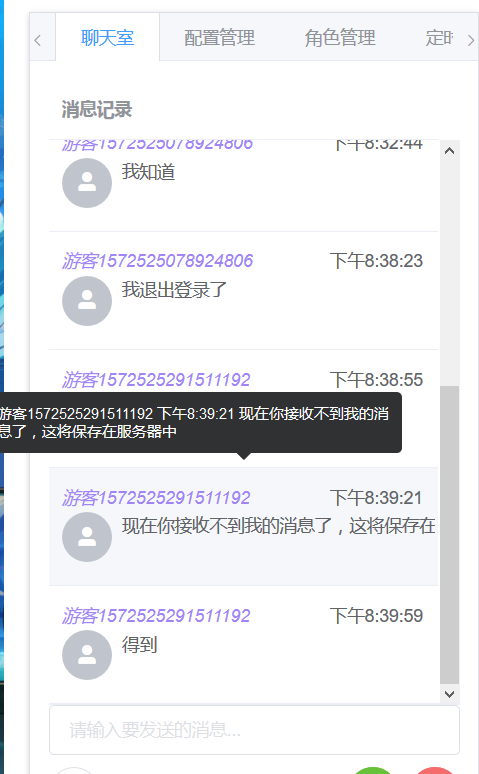
在聊天室业务中,我们需要在新消息收到后,将滚动条下拉,以便显示新消息。如果使用传统或自定义的组件,这个没有任何问题。

注意,需要在页面渲染完成后再操作滚动条

这里我选用了el-table组件,但其并未对此有相关说明。这里我只能选中el-table的元素进行dom操作:

1
2
//选中el-table的滚动条元素
let elTable = $(`#messageTable .el-table__body-wrapper`);
1
2
3
4
5
6
7
8
9
10
11
12
13
14
15
16
17
 //判断滚动条是否在底部
scrollAtFoot: function () {
let elTable = $(`#messageTable .el-table__body-wrapper`)[0];
let clientHeight = elTable.clientHeight;
let scrollHeight = elTable.scrollHeight;
let scrollTop = $('#messageTable .el-table__body-wrapper').scrollTop();
console.log("clientHeight的值为:" + clientHeight + ";scrollHeight为" + scrollHeight + ";scrollTop为" + scrollTop);
//当滚动条在底部时
if (scrollHeight - scrollTop === clientHeight) {
return true
}
},
//移动滚动条到底部
moveScroll: function () {
//注意,需要在数据更新完成,并且页面渲染完成后才做这件事
$('#messageTable .el-table__body-wrapper').scrollTop((this.historyMessages.length) * this.cellHeight);
}

后端springBoot

仍在完善中。

1
2
3
4
5
6
7
8
9
10
11
12
13
14
15
16
17
18
19
20
21
22
23
24
25
26
27
28
29
30
31
32
33
34
35
36
37
38
39
40
41
42
43
44
45
46
47
48
49
50
51
52
53
54
55
56
57
58
59
60
61
62
63
64
65
66
67
68
69
70
71
72
73
74
75
76
77
78
79
80
81
82
83
84
85
86
87
88
package cn.shirtiny.community.SHcommunity.Controller;

import ...

@Controller
public class WebSocketController {

@Autowired
private IchatHistoryService chatHistoryService;

@Autowired
private IchatMessageService chatMessageService;


//接收消息的接口路径,聊天室频道
@MessageMapping("/sendToRoom")
//发送到 /room/chat 频道
@SendTo("/room/chat")
public ShResultDTO<String,Object> retString(@RequestBody ChatMessageDTO message ) {


//聊天室记录的固定id
Long historyId=0L;
//发送者id 游客模式
senderId=message.getSenderId();

//接收者id
//暂无
//将消息存入数据库
chatMessageService.addChatMessage(message.getChatMessageContent(), historyId, senderId, null);

//从数据库中查询此聊天室的消息,广播给该频道
return tolistChatRoomMessages();
}

//创建聊天室的聊天记录表
@PostMapping(value = "/shApi/createChatRoomTable")
@ResponseBody
public ShResultDTO<String,Object> toCreateChatRoomTable(){
ChatHistory chatHistory=new ChatHistory();
chatHistory.setChatHistoryId(0L);
chatHistory.setChatHistoryName("shChatRoom");
chatHistory.setGmtCreated(System.currentTimeMillis());
chatHistory.setGmtModified(chatHistory.getGmtCreated());
boolean flag = chatHistoryService.addOneChatHistory(chatHistory);

return flag ? new ShResultDTO<>(200,"聊天室创建成功") : new ShResultDTO<>(501,"聊天室创建失败,该聊天室已存在");
}

//查询聊天室的聊天记录
@GetMapping(value = "/shApi/listChatRoomMessages")
@ResponseBody
public ShResultDTO<String,Object> tolistChatRoomMessages(){

List<ChatMessageDTO> chatMessageDTOs = chatMessageService.selectMessagesByHistoryId(0L);
Map<String,Object> map=new HashMap<>();
map.put("historyMessages",chatMessageDTOs);

return new ShResultDTO<>(200,"聊天室记录查询完成",map,null);
}

//清空聊天室的聊天记录
@GetMapping(value = "/shApi/cleanChatRoomMessages")
@ResponseBody
public ShResultDTO<String,Object> toCleanChatRoomMessages(){

chatMessageService.deleteMessagesByhistoryId(0L);

return new ShResultDTO<>(200,"聊天室记录已清空");
}

//生成一个聊天室游客id
@GetMapping(value = "/shApi/newChatRoomSenderId")
@ResponseBody
public ShResultDTO<String,Object> toNewChatRoomTouristId(HttpServletRequest request){
Map<String,Object> map=new HashMap<>();

Random random=new Random();
int touristIDNumber= random.nextInt(999);
//转成字符串,加上时间戳
String touristID=""+System.currentTimeMillis()+touristIDNumber;
System.out.println("生成的游客id为:"+touristID);
map.put("touristID",touristID);
//存入session
request.getSession().setAttribute("touristID",touristID);
return new ShResultDTO<>(200,"生成一个游客id",map,null);
}
}

表结构

ChatHistory

1
2
3
4
5
6
7
8
9
10
11
12
13
14
15
16
17
18
19
20
21
22
23
24
25
package cn.shirtiny.community.SHcommunity.Model;

import com.baomidou.mybatisplus.annotation.*;
import lombok.Data;

//聊天记录、频道
@Data
@TableName("chat_history")
public class ChatHistory {
//主键
@TableId(value = "chat_history_id",type = IdType.AUTO)
Long chatHistoryId;
//聊天记录的名称,唯一
@TableField(value = "chat_history_name",insertStrategy = FieldStrategy.NOT_EMPTY)
String chatHistoryName;
//聊天创建时间
@TableField(value = "gmt_created",insertStrategy = FieldStrategy.NOT_NULL)
Long gmtCreated;
//更新时间
@TableField(value = "gmt_modified",insertStrategy = FieldStrategy.NOT_NULL)
Long gmtModified;
//消息条数
@TableField(value = "message_num",insertStrategy = FieldStrategy.DEFAULT)
Long messageNum;
}

ChatMessage

1
2
3
4
5
6
7
8
9
10
11
12
13
14
15
16
17
18
19
20
21
22
23
24
25
26
27
28
package cn.shirtiny.community.SHcommunity.Model;

import com.baomidou.mybatisplus.annotation.*;
import lombok.Data;

//聊天消息
@Data
@TableName("chat_message")
public class ChatMessage {
//主键
@TableId(value = "chat_message_id",type = IdType.AUTO)
Long chatMessageId;
//记录此消息的 聊天记录的id
@TableField(value = "chat_history_id",insertStrategy = FieldStrategy.NOT_NULL)
Long chatHistoryId;
//消息内容
@TableField(value = "chat_message_content",insertStrategy = FieldStrategy.NOT_EMPTY)
String chatMessageContent;
//创建时间
@TableField(value = "gmt_created",insertStrategy = FieldStrategy.NOT_NULL)
Long gmtCreated;
//发送者id,可以为空
@TableField(value = "sender_id")
Long senderId;
//接收者id,可以为空
@TableField(value = "recipient_id")
Long recipientId;
}

DTO对象

1
2
3
4
5
6
7
8
9
10
11
12
13
14
15
16
17
18
19
20
21
package cn.shirtiny.community.SHcommunity.DTO;

import cn.shirtiny.community.SHcommunity.Model.ChatMessage;
import lombok.Data;

import java.util.List;
@Data
public class ChatHistoryDTO {
//主键
Long chatHistoryId;
//聊天记录的名称
String chatHistoryName;
//聊天创建时间
Long gmtCreated;
//更新时间
Long gmtModified;
//消息条数
Long messageNum;
//记录的消息列表,不在数据库中
List<ChatMessage> chatMessages;
}
1
2
3
4
5
6
7
8
9
10
11
12
13
14
15
16
17
18
19
20
21
22
23
24
package cn.shirtiny.community.SHcommunity.DTO;

import lombok.Data;

@Data
public class ChatMessageDTO {
//主键
Long chatMessageId;
//记录此消息的 聊天记录的id
Long chatHistoryId;
//消息内容
String chatMessageContent;
//创建时间
Long gmtCreated;
//发送者id
Long senderId;
//接收者id
Long recipientId;

//发送者
UserDTO sender;
//接收者
UserDTO recipient;
}