mybatis-plus

MyBatis-Plus快速上手

MyBatis-Plus是针对MyBatis的增强方案,别人造好的车轮,我们甚至SQL语句都不用写了,分页也是自动完成的。

官宣图:

话说这些技术有各种动物,还挺有趣的。

相关依赖

1
2
3
4
5
6
7
8
9
10
11
12
13
14
15
16
17
18
19
20
21
22
23
24
25
26
27
28
29
30
31
32
33
<!--数据源 -->
<dependency>
<groupId>com.alibaba</groupId>
<artifactId>druid-spring-boot-starter</artifactId>
</dependency>

<!--mysql连接驱动 -->
<dependency>
<groupId>mysql</groupId>
<artifactId>mysql-connector-java</artifactId>
<scope>runtime</scope>
</dependency>

<!--可选-->
<dependency>
<groupId>org.springframework.boot</groupId>
<artifactId>spring-boot-starter-data-jpa</artifactId>
</dependency>

<!--mybatis-plus(springBoot)-->
<dependency>
<groupId>com.baomidou</groupId>
<artifactId>mybatis-plus-boot-starter</artifactId>
<version>3.2.0</version>
</dependency>

<!--lombok-->
<dependency>
<groupId>org.projectlombok</groupId>
<artifactId>lombok</artifactId>
<version>1.18.10</version>
<optional>true</optional>
</dependency>

基础配置

  • 数据库基础
1
2
3
4
5
#数据库基础配置
spring.datasource.url=jdbc:h2:~/H2database
spring.datasource.username=***
spring.datasource.password=***
spring.datasource.driver-class-name=org.h2.Driver
  • 使用连接池时
1
2
3
4
5
6
7
8
9
# DataSource Config
spring:
datasource:
driver-class-name: org.h2.Driver
schema: classpath:db/schema-h2.sql
data: classpath:db/data-h2.sql
url: jdbc:h2:~/H2database
username: ***
password: ***
  • mybatis-plus的配置

MapperXml,如果需要的话

1
mybatis-plus.mapper-locations=classpath:/mapper/*Mapper.xml

配置类

1
2
3
4
@Configuration
@MapperScan("cn.shirtiny.community.SHcommunity.Mapper")
public class MybatisPlusConfig {
}

如果没有什么配置需要的话,直接在启动类加个@MapperScan注解就行了:

1
2
3
4
5
6
7
8
9
10
11
12
package cn.shirtiny.community.SHcommunity;

import ...
@SpringBootApplication
@MapperScan("cn.shirtiny.community.SHcommunity.Mapper")
public class CommunityApplication {

public static void main(String[] args) {
SpringApplication.run(CommunityApplication.class, args);
}

}

Mapper接口

甚至什么都不用写

1
2
3
4
5
6
package cn.shirtiny.community.SHcommunity.Mapper;

import ...

public interface InvitationMapper extends BaseMapper<Invitation> {
}
  • ok,没错,能用了,直接调用mapper接口的方法就能操作数据库了。

Mybatis-Plus的CRUD接口

如何分页

因为之前常用的是PageHelper,翻了翻Mybatis-Plus的文档,试了下,发现比PageHelper更方便,当然,因人而异。

MP分页插件

  • Mybatis-Plus内置分页插件的使用方式:

首先在刚刚Mybatis-Plus的配置类里添加:

1
2
3
4
@Bean
public PaginationInterceptor paginationInterceptor() {
return new PaginationInterceptor();
}

我的配置类

1
2
3
4
5
6
7
8
9
10
11
12
13
14
15
16
17
18
19
20
21
22
23
24
25
26
package cn.shirtiny.community.SHcommunity.Config;

import ...

@EnableTransactionManagement
@Configuration
@MapperScan("cn.shirtiny.community.SHcommunity.Mapper")
public class MybatisPlusConfig {

@Value("${myPageSize}")
private long limit;

/**
* 分页插件
*/
@Bean
public PaginationInterceptor paginationInterceptor() {
PaginationInterceptor paginationInterceptor = new PaginationInterceptor();
// paginationInterceptor.setLimit(你的最大单页限制数量,默认 500 条,小于 0 如 -1 不受限制);
paginationInterceptor.setLimit(limit);

return paginationInterceptor;
}

//...其他配置
}
  • 然后就可以用了
  • 直接调用mapper接口的selectPage()方法即可,如:
1
2
3
//null是查询条件为空,page是mybatis-plus提供的Page类
invitationMapper.selectPage(page,null);
//该方法,返回一个Ipage对象
  • 实际使用:
1
2
3
4
5
6
7
8
9
10
11
12
13
14
15
16
17
18
19
20
21
22
23
24
25
26
27
28
29
30
31
//分页展示首页的帖子
@GetMapping("/")
public String toIndexByPage(@RequestParam(value = "curPage",defaultValue = "1") long curPage ,Model model){//前往首页并分页
Page<Invitation> page=new Page<>();
page.setCurrent(curPage);
IPage<Invitation> pageInfo = invitationService.selectBypage(page);
model.addAttribute("pageInfo",pageInfo);
//总页数
long pages = pageInfo.getPages();
//若当前页大于总页数
if (curPage>pages){
return "redirect:/?curPage="+pages;
}
//若已到最后一页
if (curPage==pages){
model.addAttribute("pageError","已经到最后一页喽~,后面的页数是装饰品O(∩_∩)O");
}
//控制的打印前端标签
long[] pageNumArray=new long[7];
long pageNum=curPage-3;
for (int i=0;i<curPage+4;i++){
if (i>=pageNumArray.length){
break;
}
pageNumArray[i]=pageNum;
pageNum++;
}
model.addAttribute("pageNumArray",pageNumArray);

return "index";
}

自定义分页

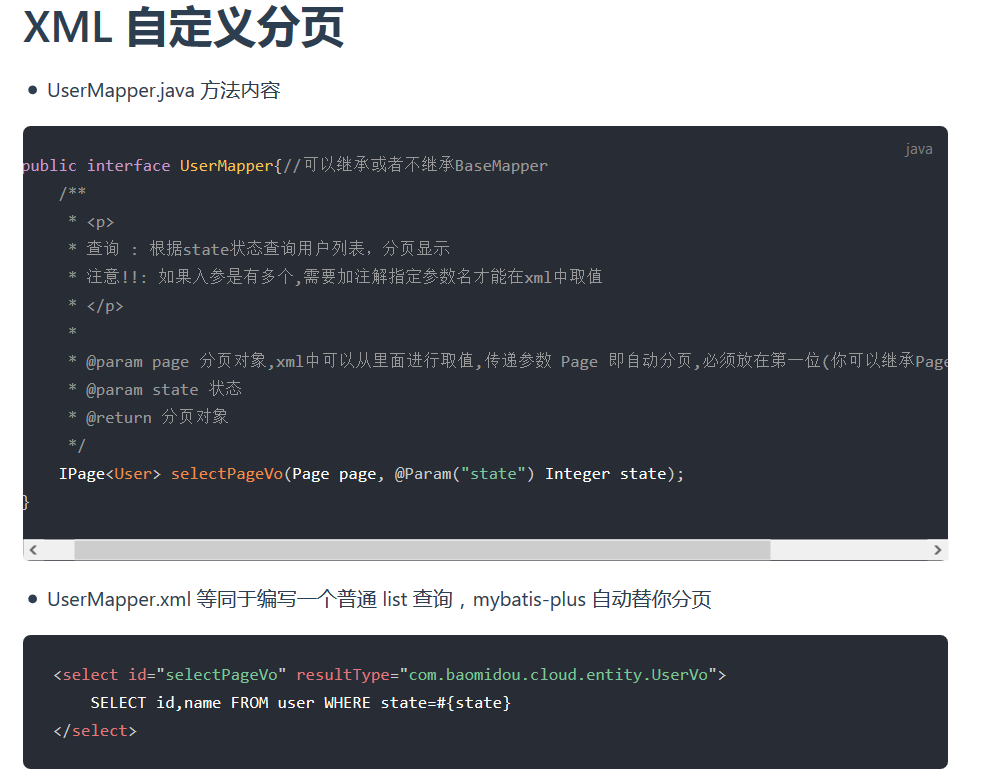
有时候我们需要自定sql语句,还想要分页,这方面的需求也是常有的。

其实很简单,你只需要在方法形参传入Page,返回Ipage即可,mybatis-plus自动帮你分页,比如:

1
2
3
4
5
6
7
8
9
10
package cn.shirtiny.community.SHcommunity.Mapper;

import ...

public interface InvitationMapper extends BaseMapper<Invitation> {
//自定义的分页方法
@Select("select * from USER u join INVITATION i on u.ID=i.AUTHOR_ID")
IPage<InvitationDTO> selectDtoByPage(Page<InvitationDTO> page);

}

官方的描述:

注解

说一下基本使用,详细请查阅官方文档

类对应的表名,如:

1
@TableName("comment")

标识域为数据库表主键id,可设置id类型(数据库自增或无状态等),如:

1
@TableId(value = "comment_id",type = IdType.AUTO)

非主键字段,可以指定字段名、是否为数据库表字段,插入时是否允许为空等,如:

1
@TableField(value = "reviewer_id",insertStrategy = FieldStrategy.NOT_NULL)

基本的模型如:

1
2
3
4
5
6
7
8
9
10
11
12
13
14
15
16
17
18
19
20
21
22
23
24
package cn.shirtiny.community.SHcommunity.Model;

import com.baomidou.mybatisplus.annotation.*;
import lombok.Data;

@TableName("comment")
@Data
public class Comment {
//评论的主键id
@TableId(value = "comment_id",type = IdType.AUTO)
long commentId;
//评论者id
@TableField(value = "reviewer_id",insertStrategy = FieldStrategy.NOT_NULL)
long reviewerId;
//被评论的对象id
@TableField(value = "target_id",insertStrategy = FieldStrategy.NOT_NULL)
long targetId;
//评论内容
@TableField(value = "comment_content",insertStrategy = FieldStrategy.NOT_NULL)
String commentContent;
//创建时间
@TableField(value = "created_time",insertStrategy = FieldStrategy.NOT_NULL)
long createdTime;
}