JsonP跨域请求

使用JsonP跨域获取json数据

JsonP示例

JsonP的主要实现举例:

1
2
3
4
5
6
7
8
9
10
11
12
13
14
15
16
17
18
19
20
21
22
23
24
25
26
27
28
29
30
var category = {OBJ: $("#_JD_ALLSORT"),
URL_Serv: "http://localhost:8082/category.json"
},FN_GetData: function() {
//使用jsonp来实现跨域请求
$.getJSONP(this.URL_Serv, category.getDataService);
//直接使用ajax请求json数据
/*$.getJSON(this.URL_Serv, function(json){
category.getDataService(json);
});*/

//解析json数据
},getDataService: function(a) {
var b = [], c = this;
$.each(a.data, function(a) {
this.index = a, "l" == this.t && (this.i = c.FN_RefactorJSON(this.i, 7)), b.push(c.renderItem(this, a))
});
b.push('<div class="extra"><a {if pageConfig.isHome}clstag="homepage|keycount|home2013|0614a"{/if} href="http://www.jd.com/allSort.aspx">\u5168\u90e8\u5546\u54c1\u5206\u7c7b</a></div>'), this.OBJ.attr("load", "1").html(b.join("")), $.bigiframe(this.OBJ), this.FN_GetBrands();
var d = this, e = this.OBJ.outerWidth(), f = this.OBJ.outerHeight();
$("#_JD_ALLSORT").dropdown({delay: 0,onmouseleave: function() {
$("#_JD_ALLSORT .item").removeClass("hover")
}}, function(a) {
var b, c, g = document.documentElement.scrollTop + document.body.scrollTop, h = $("#nav-2013").offset().top + 39;
h >= g ? (c = a.hasClass("fore13") ? 3 : 3, g = c) : (b = a.offset().top, g = g > b - 5 ? b - h - 10 : Math.max(3, g - h));
var i = a.find(".i-mc");
if (i.css({top: g + "px"}), d.OBJ.find("iframe")) {
var j = i.outerWidth() + e, k = i.outerHeight() > f ? i.outerHeight() : f;
d.OBJ.find("iframe").css({width: j,height: k,top: g})
}
})
}

其中,http://localhost:8082/category.json的内容为:

1
2
3
4
5
6
7
8
9
10
11
12
13
14
15
16
17
18
19
20
category.getDataService(
{
"data": [
{
"u": "/products/1.html",
"n": "<a href='/products/1.html'>图书、音像、电子书刊</a>",
"i": [
{
"u": "/products/2.html",
"n": "电子书刊",
"i": [
"/products/3.html|电子书",
"/products/4.html|网络原创",
"/products/5.html|数字杂志",
"/products/6.html|多媒体图书"
]
}
]
}]}
);

其实是一段js,把json包装在参数里。

跨域请求

为什么不能直接用Ajax

直接使用ajax请求另一个端口上的json数据:

1
2
3
4
//直接使用ajax请求另一个端口上的json数据
$.getJSON(this.URL_Serv, function(json){
category.getDataService(json);
});

会出现以下异常:

No 'Access-Control-Allow-Origin'

什么是跨域

当一个请求url的协议、域名、端口三者之间任意一个与当前页面url不同即为跨域。

协议http->https、端口8081->8082、域名Shirtiny.cn->Github.com,都为跨域。

跨域问题的产生

同源策略Sameoriginpolicy)是一种约定,它是浏览器最核心也最基本的安全功能。

同源策略会阻止一个域的javascript脚本和另外一个域的内容进行交互。所谓同源(即指在同一个域)就是两个页面具有相同的协议(protocol),主机(host)和端口号(port

跨域的解决方式

  • document.domain
  • 跨文档通信 API
  • JSONP
  • CORS

JsonP流程

JSONP 只支持get请求,不支持post请求。

核心思想:用特定方式请求 JSON 数据,服务器收到请求后,将数据放在一个指定名字的回调函数的参数位置传回来。

数据库查询->构建pojo对象

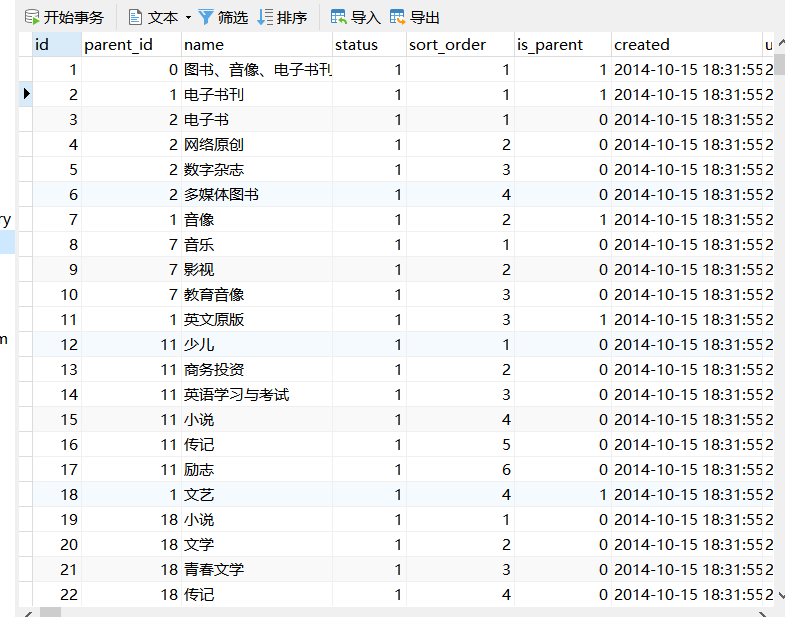
首先需要把数据库中的数据查询出来,数据库中有时并不是直接保存的json数据,如存储的分类目录表:

1
2
3
4
5
6
7
8
9
10
11
12
13
CREATE TABLE `tb_item_cat` (
`id` bigint(20) NOT NULL AUTO_INCREMENT COMMENT '类目ID',
`parent_id` bigint(20) DEFAULT NULL COMMENT '父类目ID=0时,代表的是一级的类目',
`name` varchar(50) DEFAULT NULL COMMENT '类目名称',
`status` int(1) DEFAULT '1' COMMENT '状态。可选值:1(正常),2(删除)',
`sort_order` int(4) DEFAULT NULL COMMENT '排列序号,表示同级类目的展现次序,如数值相等则按名称次序排列。取值范围:大于零的整数',
`is_parent` tinyint(1) DEFAULT '1' COMMENT '该类目是否为父类目,1为true,0为false',
`created` datetime DEFAULT NULL COMMENT '创建时间',
`updated` datetime DEFAULT NULL COMMENT '创建时间',
PRIMARY KEY (`id`),
KEY `parent_id` (`parent_id`,`status`) USING BTREE,
KEY `sort_order` (`sort_order`)
) ENGINE=InnoDB AUTO_INCREMENT=1183 DEFAULT CHARSET=utf8 COMMENT='商品类目';

为了能让查询到的数据转为json格式,我们需要构建Pojo对象。

需要的Json数据格式:
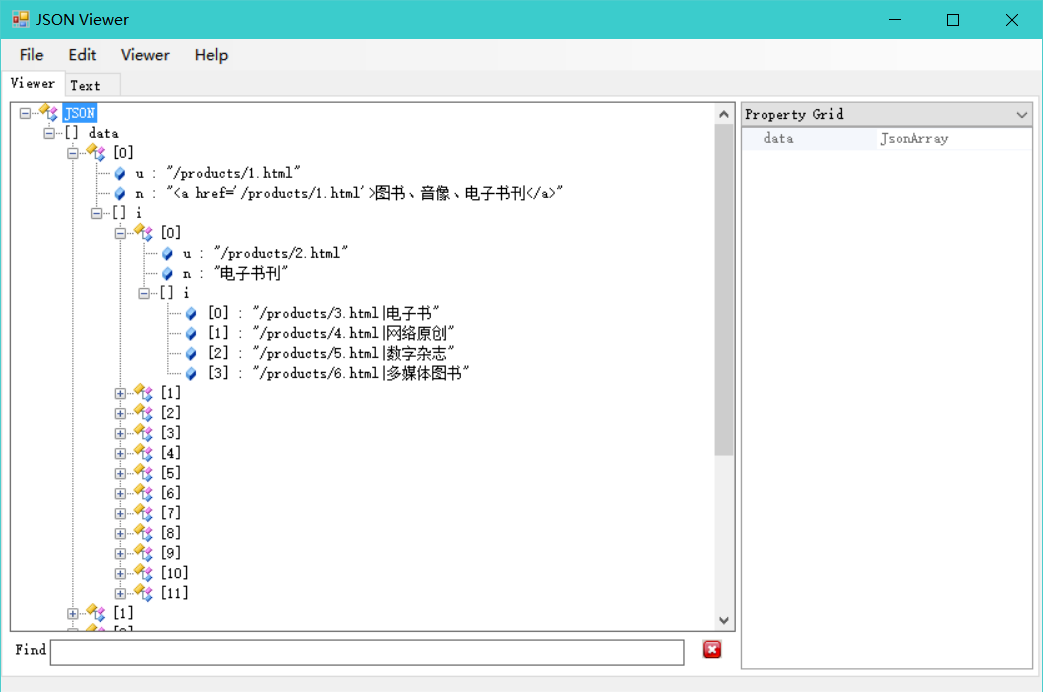
我们可以看到data是根节点,它有很多[0]、[1]、[2]这样的节点。节点包含属性u、n、i,而其中i又是一个子节点,它又包含了自己的u、n、i属性,其中i最终包含了若干字符串。

pojo类的构建

我们把根节点data单独拿出来,构建出JsonData类,因为一个Json里会有1个存放节点集合的data根节点。

1
2
3
4
5
6
7
8
9
10
11
12
13
14
15
16
17
18
19
20
21
22
23
24
25
26
27
28
29
30
31
package com.SH.Rest.Pojo;

import java.util.List;

public class JsonData {

List<?> data;


public List<?> getData() {
return data;
}

public void setData(List<?> data) {
this.data = data;
}

public JsonData(List<?> data) {
this.data = data;
}

public JsonData() {
}

@Override
public String toString() {
return "JsonData{" +
"data=" + data +
'}';
}
}

每个data的节点以及节点的子节点,都有u、n、i 这3个属性,其中i都为一个集合,所以我们构建DataNode类,用来表示子节点。使用@JsonProperty(“”)注解,用来指定对应属性,转换成json数据对应的key名称。

1
2
3
4
5
6
7
8
9
10
11
12
13
14
15
16
17
18
19
20
21
22
23
24
25
26
27
28
29
30
31
32
33
34
35
36
37
38
39
40
41
42
43
44
45
46
47
48
49
50
51
52
53
54
55
56
57
58
59
package com.SH.Rest.Pojo;

import com.fasterxml.jackson.annotation.JsonProperty;

import java.util.List;

public class DataNodes {

@JsonProperty("u")
String url;

@JsonProperty("n")
String name;

@JsonProperty("i")
List<?> item;

public DataNodes() {
}

public DataNodes(String url, String name, List<?> item) {
this.url = url;
this.name = name;
this.item = item;
}

@Override
public String toString() {
return "DataNodes{" +
"url='" + url + '\'' +
", name='" + name + '\'' +
", item=" + item +
'}';
}

public String getUrl() {
return url;
}

public void setUrl(String url) {
this.url = url;
}

public String getName() {
return name;
}

public void setName(String name) {
this.name = name;
}

public List<?> getItem() {
return item;
}

public void setItem(List<?> item) {
this.item = item;
}
}

Service递归构建,得到节点pojo对象集合

1
2
3
4
5
6
7
8
9
10
11
12
13
14
15
16
17
18
19
20
21
22
23
24
25
26
27
28
29
30
31
32
33
34
35
36
37
38
39
40
41
42
43
44
45
46
47
package com.SH.Rest.Service.serviceImpl;

import ...

@Service
public class JsonPserviceImpl implements IJsonPService {

@Autowired
private TbItemCatMapper tbItemCatMapper;

@Override
public List<?> selectJson(long parentId) {

//设定查询条件,先查询库中所有parentId为0的目录,即所有顶层目录
TbItemCatExample example = new TbItemCatExample();
TbItemCatExample.Criteria criteria = example.createCriteria();
criteria.andParentIdEqualTo(parentId);
List<TbItemCat> list = tbItemCatMapper.selectByExample(example);//执行

List resultList = new ArrayList<>();
//向list中添加节点
for (TbItemCat tbItemCat : list) {
//判断是否为父节点
if (tbItemCat.getIsParent()) {
DataNode dataNode = new DataNode();
if (parentId == 0) {
dataNode.setName("<a href='/products/"+tbItemCat.getId()+".html'>"+tbItemCat.getName()+"</a>");
} else {
dataNode.setName(tbItemCat.getName());
}
dataNode.setUrl("/products/"+tbItemCat.getId()+".html");

//递归
dataNode.setItem(selectJson(tbItemCat.getId()));

resultList.add(dataNode);
//如果是叶子节点
} else {
resultList.add("/products/"+tbItemCat.getId()+".html|" + tbItemCat.getName());
}
}


return resultList;

}
}

Controller把节点集合封装到data根节点对象,然后转换成json字符串

1
2
3
4
5
6
7
8
9
10
11
12
13
14
15
16
17
18
19
20
21
22
23
24
25
26
27
28
package com.SH.Rest.Controller;

import ...

@Controller
public class JsonPController {

@Autowired
private IJsonPService jsonPService;

@RequestMapping(value = "/AllCategory",produces = "text/plain;charset=UTF-8")
/*设置输出编码,或
@RequestMapping(value="/itemcat/list",
produces=MediaType.APPLICATION_JSON_VALUE + ";charset=utf-8")
*/
@ResponseBody
public String AllCategory(String callBack){

List<?> dataNodelist = jsonPService.selectJson(0);
JsonData data=new JsonData();
data.setData(dataNodelist);
String json = JsonUtils.objectToJson(data);
//拼接成js语句,callBack参数为请求中传递来的函数名
json=callBack+"("+json+");";

return json;
}
}

另一种方式(需要spring版本支持):

1
2
3
4
5
6
7
8
9
10
@RequestMapping("/AllCategory")
@ResponseBody
public Object AllCategory(String callBack) {
List<?> dataNodelist = jsonPService.selectJson(0);
JsonData data=new JsonData();
data.setData(dataNodelist);
MappingJacksonValue mappingJacksonValue = new MappingJacksonValue(data);
mappingJacksonValue.setJsonpFunction(callback);
return mappingJacksonValue;
}

此时客户端只需要发请求:

1
http://本机:端口/AllCategory?callBack=自定义函数

然后会自动调用自定义的函数,并将参数值(也就是json数据)传过来,详情可以看文章开头。

CORS方式