SSM+easyUI分页查询

使用mybatis分页插件

1. jar包和依赖:

  • jsqlparser-0.9.5.jar(sql 解析工具)

    • 1
      2
      3
      4
      5
      6
      <!--sql 解析工具依赖,配合分页使用-->
      <dependency>
      <groupId>com.github.jsqlparser</groupId>
      <artifactId>jsqlparser</artifactId>
      <version>0.9.5</version>
      </dependency>
  • pagehelper-5.1.2.jar

    • 1
      2
      3
      4
      5
      6
      <!--myBatis分页插件 -->
      <dependency>
      <groupId>com.github.pagehelper</groupId>
      <artifactId>pagehelper</artifactId>
      <version>5.1.2</version>
      </dependency>

2. spring配置文件

ApplicatonContext.xml的sqlSessionFactory里配置一个载入插件的属性,名为plugins,用array来配置多个插件。

  • 增加一个插件(拦截器),用标签

  • 用bean,class为pagehelper的jar包中的PageInterceptor类。

    • 此类中有个名为properties的属性,使用value对其赋值
  • value内填写:helperDialect=mysql(设置连接的是什么数据库,如mysql、Oracle)

    如:

    1
    2
    3
    4
    5
    6
    7
    8
    9
    10
    11
    12
    13
    14
     <bean id="sqlSessionFactory" class="org.mybatis.spring.SqlSessionFactoryBean"> 
    <property name="dataSource" ref="dataSource"/>
    <property name="plugins">
    <array>
    <bean class="com.github.pagehelper.PageInterceptor">
    <property name="properties">
    <value>
    helperDialect=mysql
    </value>
    </property>
    </bean>
    </array>
    </property>
    </bean>

3. Controller

在你需要进行分页的 MyBatis 查询方法前调用 PageHelper.startPage 静态方法即可,该方法需要两个参数pageNumpageSize,紧跟在这个方法后的第一个MyBatis 查询方法会被进行分页。

1
2
3
4
5
6
7
8
//request: url?pageNum=1&pageSize=10
//支持 ServletRequest,Map,POJO 对象,需要配合 params 参数
PageHelper.startPage(request);
//紧跟着的第一个select方法会被分页
List<Country> list = countryMapper.selectIf(1);

//后面的不会被分页,除非再次调用PageHelper.startPage
List<Country> list2 = countryMapper.selectIf(null);

使用:

1
2
3
4
5
6
7
8
9
10
11
12
13
14
15
16
17
18
19
20
 /** 使用pagehelper+PageInfo进行分页查询 */
//private Map<String,Object> result= new HashMap<String,Object>();

@RequestMapping(value = "/selectBypage")
@ResponseBody//将返回值转为json数据格式
public Map<String,Object> selectBypage(Integer page,Integer rows,HashMap<String,Object> map){
//使紧跟其后的mybatis查询分页
PageHelper.startPage(page,rows);
List<Vocaloid> vocaloidsBypage=vocaloidService.selectAll();
//将查询结果封装
PageInfo<Vocaloid> pageInfo=new PageInfo<>(vocaloidsBypage);
long total = pageInfo.getTotal();
List<Vocaloid> list = pageInfo.getList();

map=new HashMap<>();
map.put("rows",list);
map.put("total",total);
//其实直接把查询结果vocaloidsBypage放到rows就可以了
return map;
}

4. 什么时候会导致不安全的分页?

1
2
3
4
5
6
7
8
//获取第1页,10条内容,默认查询总数count
PageHelper.startPage(1, 10);
List<Country> list;
if(param1 != null){
list = countryMapper.selectIf(param1);
} else {
list = new ArrayList<Country>();
}

这种情况下由于 param1 存在 null 的情况,就会导致 PageHelper 生产了一个分页参数,但是没有被消费,这个参数就会一直保留在这个线程上。当这个线程再次被使用时,就可能导致不该分页的方法去消费这个分页参数,这就产生了莫名其妙的分页。

上面这个代码,应该写成下面这个样子:

1
2
3
4
5
6
7
8
List<Country> list;
if(param1 != null){
//获取第1页,10条内容,默认查询总数count
PageHelper.startPage(1, 10);
list = countryMapper.selectIf(param1);
} else {
list = new ArrayList<Country>();
}

这种写法就能保证安全。

5. 跳转页面过界

如果你分页插件使用于类似分页查看列表式的数据,如新闻列表,软件列表, 你希望用户输入的页数不在合法范围(第一页到最后一页之外)时能够正确的响应到正确的结果页面, 那么你可以配置 reasonabletrue,这时如果 pageNum<=0 会查询第一页,如果 pageNum>总页数 会查询最后一页。

1
2
3
4
5
6
7
8
9
10
11
12
13
14
15
16
17
18
19
20
21
22
23
24
25
26
 <bean id="sqlSessionFactory" class="org.mybatis.spring.SqlSessionFactoryBean"> 
<property name="dataSource" ref="dataSource"/>
<property name="mapperLocations">
<array>
<value>classpath:mapper/*.xml</value>
</array>
</property>
<property name="typeAliasesPackage" value="com.isea533.mybatis.model"/>
<property name="plugins">
<array>
<bean class="com.github.pagehelper.PageInterceptor">
<!-- 这里的几个配置主要演示如何使用,如果不理解,一定要去掉下面的配置 -->
<property name="properties">
<value>
helperDialect=mysql
reasonable=true
supportMethodsArguments=true
params=count=countSql
autoRuntimeDialect=true
</value>
</property>
</bean>

</array>
</property>
</bean>

了解更多…

使用easyUI

1. 启用easyui-datagrid

easyui-datagrid下设置:pagination:true

显示分页菜单:

整体代码如:

1
2
3
4
5
6
7
8
9
10
11
12
13
14
15
16
17
18
19
20
21
22
23
24
25
26
27
28
29
30
31
32
33
34
35
36
37
38
39
40
41
42
43
44
45
46
47
<!--数据网络-->
<table id="vstable"></table>

<script type="text/javascript" >
$(function () {
$("#vstable").datagrid({
fitcolumns:true,
url:"${pageContext.request.contextPath}/vocaloidController/vSelectAll.action",
columns:[[
{
field:"null",
checkbox:true
},
{
field:"id",
title:"ID",
width:100
},
{
field:"name",
title:"Name",
width:100
},
{
field:"sex",
title:"Sex",
width:100
},
{
field:"color",
title:"Color",
width:100
},
{
field:"team_id",
title:"Team_ID",
width:100
}
]],
//显示分页栏
pagination:true,
//工具条
toolbar:"#tb"
});
});

</script>

2. 参数解析

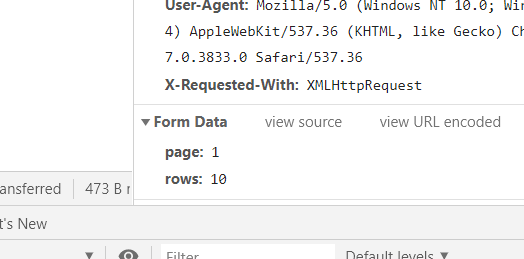
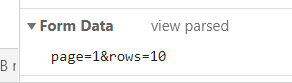
easyUI会向后台发送两个参数,page和rows:

传参形式为:
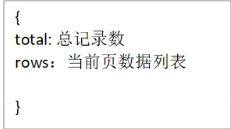
而后台不仅需要给easyUI传递json格式的查询结果,而且还需要传递total和rows:
3. easyUI配合controller的增删改查

  1. 添加:
  • Controller:
1
2
3
4
5
6
7
8
9
10
11
12
13
14
15
@RequestMapping(value = "/InsertBypage")
@ResponseBody
public Map<String,Object> InsertBypage(Vocaloid vocaloid,HashMap<String,Object> map){

boolean b = vocaloidService.insertOne(vocaloid);
map=new HashMap<>();
System.out.println(b);
if (b){
map.put("success",b);
return map;
}else{
map.put("success",b);
return map;
}
}
  • Service:
1
2
3
4
5
6
7
8
9
10
11
12
13
14
15
    @Override
public boolean insertOne(Vocaloid vocaloid) {
boolean b;
//将插入成功的返回值设为true,异常的返回值为false
try {
b = vocaloidMapper.insertOne(vocaloid);
}catch (Exception e){
b=false;
e.printStackTrace();
}

// int e=11/0;//异常测试
System.out.println("新增一行vocaloid,返回:" + b);
return b;
}
  • html&Js
1
2
3
4
5
6
7
8
9
10
11
12
13
14
15
16
17
18
19
20
21
22
23
24
25
26
27
28
29
30
31
32
33
34
35
36
37
38
39
40
41
42
43
44
45
46
47
48
49
50
51
52
53
54
55
56
57
58
59
60
61
<%--easyUI按钮,增删改查工具条,iconCls是图标,plain:true是按钮3d感?--%>
<div id="CRUDbutton">
<a id="addButton" href="#" class="easyui-linkbutton" data-options="iconCls:'icon-add'">添加</a>
<a id="updateButton" href="#" class="easyui-linkbutton" data-options="iconCls:'icon-edit',plain:true">修改</a>
<a id="deleteButton" href="#" class="easyui-linkbutton" data-options="iconCls:'icon-remove',plain:true">删除</a>
</div>

<%--编辑窗口,默认关闭状态,用js控制打开--%>
<%--div--%>
<div id="Edit_window" class="easyui-window" title="客户数据编辑" style="width:500px;height:300px"
data-options="modal:true,closed:true">
<form id="insertForm" method="post">
<label>ID</label><input type="text" name="id" class="easyui-validatebox" data-options="required:true"><br>
<label>Name</label><input type="text" name="name" class="easyui-validatebox"><br>
<label>Sex</label><input type="text" name="sex"><br>
<label>Color</label><input type="text" name="color"><br>
<label>Team_ID</label><input type="text" name="team_id"><br>
<a id="insert_Button" href="#" class="easyui-linkbutton">确定</a>
</form>
</div>

<%--增加按钮的事件--%>
<script type="text/javascript">
$(function () {
// 点击“添加”按钮时,打开窗口
$("#addButton").click(function () {
//打开窗口前清空里面的表单
$("#insertForm").form("clear");
//打开窗口
$("#Edit_window").window("open")
});
//点击确定按钮(上面的a标签)触发controller和事件
$("#insert_Button").click(function () {
$("#insertForm").form(
"submit",
{url:"${pageContext.request.contextPath}/vocaloidController/InsertBypage.action",
//success:服务器执行完毕回调函数
success:function(data){ //data: 服务器返回的数据,类型字符串类,此时我在InsertBypage方法返回值里放入了success变量
//把data字符串类型转换对象类型
data = eval("("+data+")");

if (data.success) {
//关闭窗口
$("#Edit_window").window("close");
//刷新datagrid
$("#vstable").datagrid("reload");
$.messager.alert("提示"+data.success,"增加成功");
}else {
//关闭窗口
$("#Edit_window").window("close");
//刷新datagrid
$("#vstable").datagrid("reload");
$.messager.alert("提示"+data.success+"增加失败:","可能是id重复");
}
}
}

);
});
});
</script>